Radical Accessibility and the Hyperaudio Lite Editor
I have mixed feelings on the use of the word Radical, but I have to admit that Radical Accessibility has a certain ring to it and as it turns out, I'm not the only one who thinks so. For example, the term Radical Accessibility shows up in research by Ruth Garde, who traces it to a workshop with the artist Carmen Papalia, where he described it as disabled people's agency to define the terms of their own access, in contrast with the compliance-driven approach of most institutions, which he called "ground floor" access.
I'm making a different argument that shares the same starting point – meeting the regulations is where accessibility begins, not where it ends. Papalia pushes up from that ground floor, towards agency and self-determination. I want to push down, into the layers below the interface – the hosting, the dependencies, the build process – where the decisions around who can access what are made largely out of sight, and rarely considered accessibility decisions at all.
If you take a macro view of the internet – accessibility affects every layer, from how data is exposed to how it is consumed. Everything we do on the internet has an accessibility angle. Broadly put, accessibility is a guarantee that people can access certain things and that guarantee, if you try to keep it, involves a broad understanding of whatever area you are applying accessibility to. The internet is a heady combination of people, technology and knowledge (data) – the concept and practice of implementing accessibility covers a broad spectrum of topics spanning the social, technical and often sociotechnical.
The W3C write:
The Web is fundamentally designed to work for all people, whatever their hardware, software, language, location, or ability. When the Web meets this goal, it is accessible to people with a diverse range of hearing, movement, sight, and cognitive ability.
Thus the impact of disability is radically changed on the Web because the Web removes barriers to communication and interaction that many people face in the physical world. However, when websites, applications, technologies, or tools are badly designed, they can create barriers that exclude people from using the Web.
If we zoom in a little more even a web application has many aspects that merit consideration related to accessibility, in no particular order:
- Web Accessibility – readable text, adequate contrast ratios. Can the application be used with screen readers etc?
- Language – do translations exist? Is the application localised?
- Media Accessibility – Volume, playback rates, captions, interactive transcripts, navigability
- Hosting – Where is the application hosted? Is it available to everyone? Can it run locally?
- Resilience (related to hosting) – Is availability guaranteed?
- Device compatibility – Does it work on any machine? Is installation frictionless? What build process is required? What infrastructure is required?
- Ease of use – is the application easy to use / intuitive? Does clear documentation exist?
- Ease of installation and longevity – What are its dependencies? Is there a build system? Will it last?
- Adjustability – Is it open source? Is the code readable? Can it be easily modified?
- Performance – Does the application give you access to data and functionality in a timely manner? Do longer running tasks impart useful information while in progress?
- Cost – Do you have to pay to use it? Does it consume significant energy? Does it require special hardware?
- Portability – can any data you put in be easily got back out? Can you move data between installations?
All of the above considerations play some part in the application’s accessibility. Ideally we’d address all of them. It’s worth taking a look at how the W3C defines Web Accessibility:
Web accessibility encompasses all disabilities that affect access to the Web, including:
- auditory
- cognitive
- neurological
- physical
- speech
- visual
Web accessibility also benefits people without disabilities, for example:
people using mobile phones, smart watches, smart TVs, and other devices with small screens, different input modes, etc. older people with changing abilities due to ageing people with “temporary disabilities” such as a broken arm or lost glasses people with “situational limitations” such as in bright sunlight or in an environment where they cannot listen to audio people using a slow Internet connection, or who have limited or expensive bandwidth
https://www.w3.org/WAI/fundamentals/accessibility-intro/
The W3C definition already looks beyond disability, mentioning issues such as bandwidth requirements. I’m pushing the definition a little further and have been building the Hyperaudio Lite Editor against most of these, some are done, some are still in the planning stage.
Our transcript editor can automatically transcribe audiovisual content while preserving accurate word timings allowing you to correct, manipulate and publish that content all within the browser.
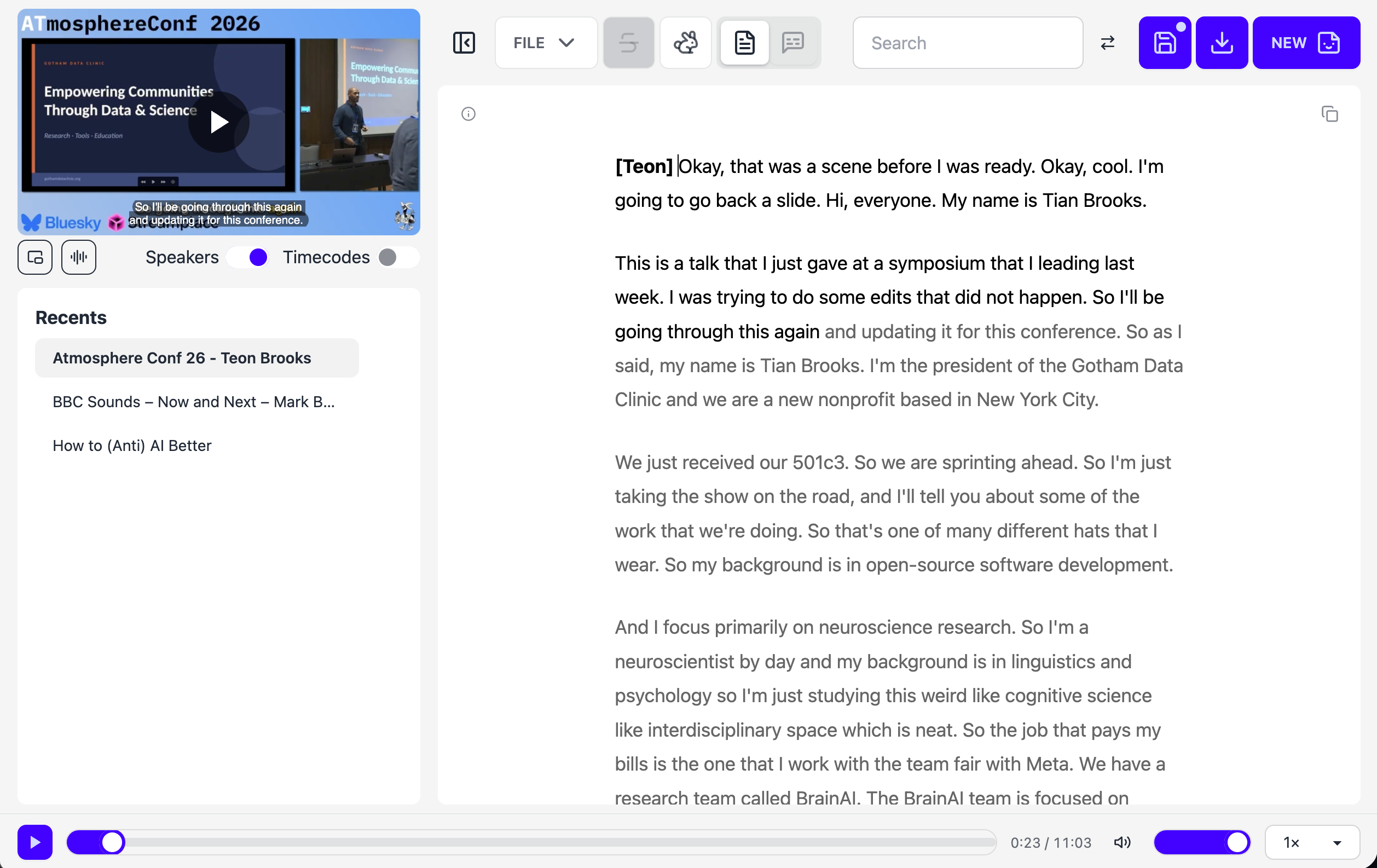
Fig 1 – Hyperaudio Lite Editor – main page
1. Web Accessibility – the ground floor
Web Accessibility as most people know it generally deals with auditory, cognitive, neurological, physical, speech and visual disabilities as mentioned above. Note that tools like Chrome’s Lighthouse can give you a good starting point, but it’s recommended that you consult an accessibility expert and use results of user testing if possible. This type of accessibility is part of many countries' regulations and is what most people think of when we talk about accessibility for web apps and sites. Currently the editor has good Lighthouse scores but the real work still needs to be done when it comes to consulting an expert and proper user testing.
This type of accessibility is covered by the W3C's WCAG guidelines, which many countries' regulations reference.
2. Language
Perhaps an obvious accessibility enhancement is to translate content so that it can be more easily accessed by people speaking a variety of languages. Browsers already do an OK job of translating content and that is only going to get better, but for the best quality it’s worth creating workflows with humans involved that can identify mistranscribed parts, or perhaps just parts that could be transcribed better, and correct accordingly. In the editor we have both captions and transcripts which are ripe for translation – the idea being to employ machine translation as a first pass, which should then be corrected and improved by somebody with a good knowledge of the target language.
A side note, but an important one – localisation is another output from translation, often dealt with exclusively by humans, it deals with the translation of any text in the application interface itself, such as menus, modals and buttons.
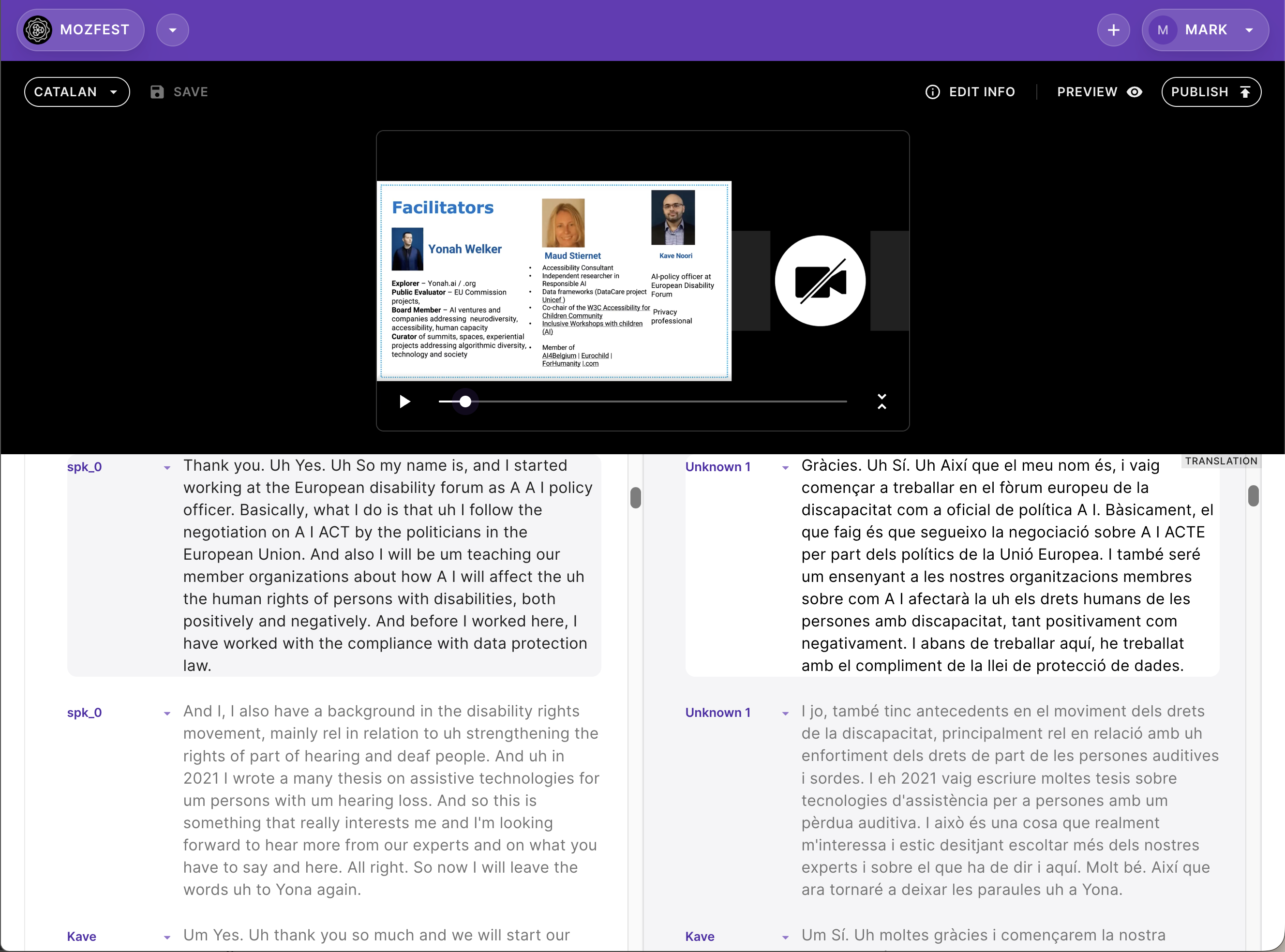
Fig 2 – The translation flow from the Hyperaudio for Conferences Prototype showing Original English on the left and Catalan on the right
3. Media Accessibility
As I work almost exclusively in the audiovisual world, Media Accessibility is close to my heart and something that I have written about before (https://maboa.it/media-accessibility/). The W3C definition touches on this:
The Web offers the possibility of unprecedented access to information and interaction for many people with disabilities. That is, the accessibility barriers to print, audio, and visual media can be much more easily overcome through web technologies. --W3C
The main area where we can improve media accessibility is the written representation of spoken content. A quick clarification on scope – screen readers also involve audio, but they work in the opposite direction, turning written content into speech. That's media used to enhance accessibility rather than media being made accessible. Here I'm concerned with the reverse – making spoken and visual content available in written and navigable form. Essentially, the easier we make it to consume media in all its different forms, the better.
Captions have been the traditional way of representing spoken content, this works both with people consuming media without hearing the audio and also to reinforce the spoken word where audio is available. For non-spoken content we can also use something sometimes called Narrative Text, some study of which you can see in this blog post working on systems for the BBC https://biffud.com/tldr/bbc-ant-v1/
The big win here though is interactive transcripts that provide both feedback and a method of media navigation – this is the heart and soul of the editor not only providing an interface for transcript based editing but also a format to publish in.
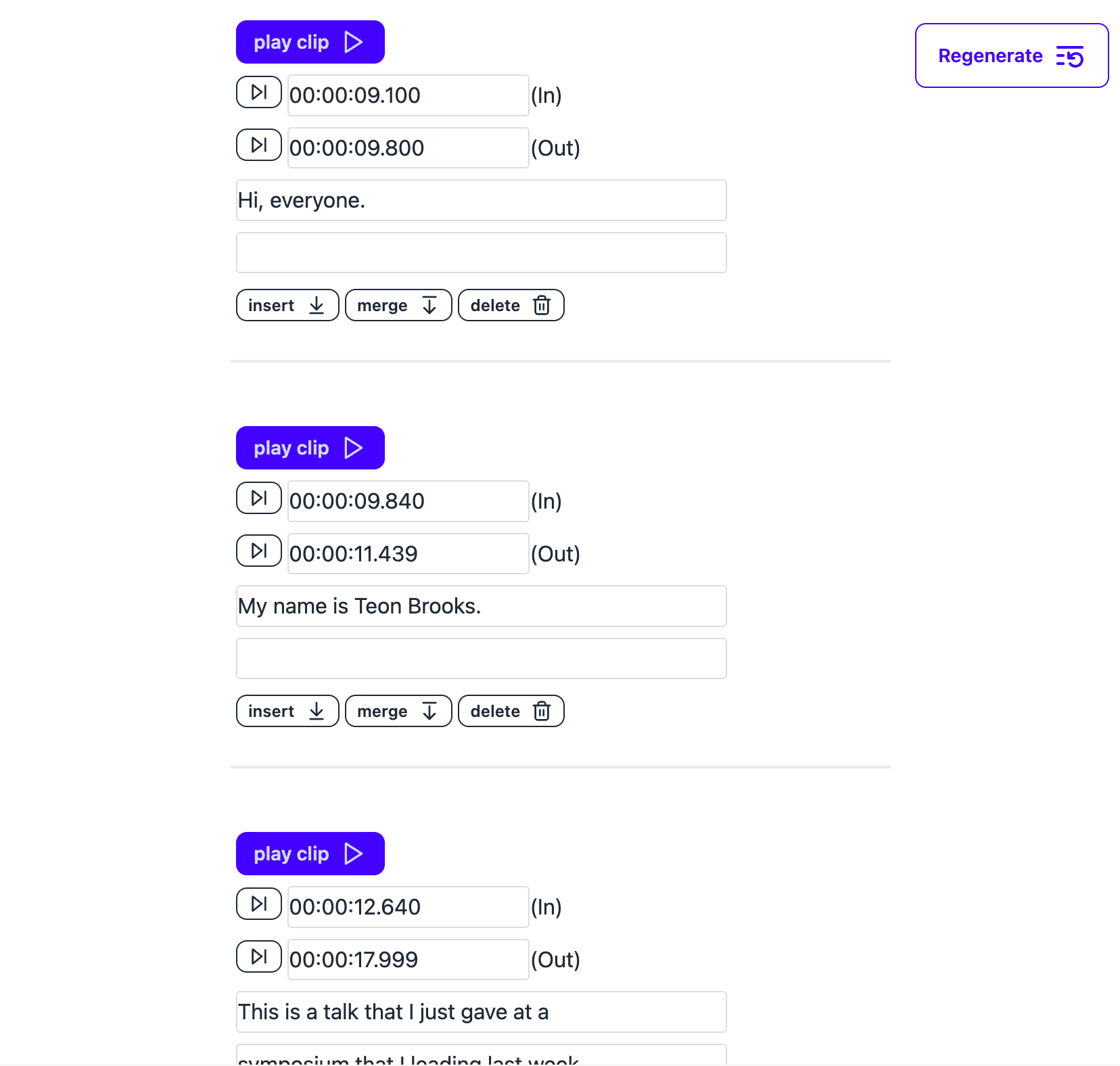
Fig 3 – Hyperaudio Lite Editor – caption editor
4. Hosting
Hosting might not be the first thing that comes to mind when considering accessibility, but it’s a crucial element for web applications. The editor is a Progressive Web App (PWA) which can be installed from your browser as an application that for all intents and purposes functions very much like a native application, at which point, if designed well you end up self-hosting. But what of the initial installation, updates and the like? Web-based hosting is likely still required.
There's also the question of where processing happens. Cloud transcription is fine for most people and most material, but some recordings come with constraints the holder didn't set – jurisdictional limits, consent that never covered third-party processing, privacy concerns and cultural protocols. Because the editor transcribes in the browser, we can avoid that question.
Hosting deserves careful consideration if we are to guarantee accessibility – there’s the application itself, but also any dependencies and in the case of our editor the models used for transcription that are downloaded separately on demand. Dependencies such as Javascript libraries can be pulled locally, but models are more difficult to deal with and a potential single point of failure if you get it wrong, ideally you should only need to download the model once.
My feeling is that decentralised protocols can be potentially of great help here, providing a robust and distributed layer for storing data and the work that I’m doing with the ATProto community hopes to support that and by doing so address the wider implications of robustness, availability and scalability, which brings us neatly on to the next section.
5. Resilience and Availability
Data sources can become inaccessible for a number of reasons. Geographical restrictions, Denial of Service attacks, government takedowns are all scenarios that we need to plan for when making sure we maintain accessibility to our resources. In parallel you’d be well advised to consider the authenticity and provenance aspects of that data. These are the issues I wrote about in detail in my previous blog post Keeping Archives Alive: Resilience and Discovery on ATProto https://maboa.it/resilient-archives-on-the-at-protocol/
6. Device compatibility – from zero to up and running
The browser ensures that web-based applications run on most devices – the main body of work for broad device compatibility involves the responsiveness of any web application. How it looks and behaves on a phone, tablet, laptop, TV, multi-screen setup are all considerations required for maximising accessibility across the board. This requires good User Interface (UI) and User Experience (UX) design which should flow from solid product development processes. Different input mechanisms, screen sizes, processing power, bandwidth all need to be factored in.
Not everyone has access to the latest browsers so graceful degradation becomes a useful approach in providing partial access to these users. Ideally, where functionality is missing the reasons (and way to address it) should be clearly communicated.
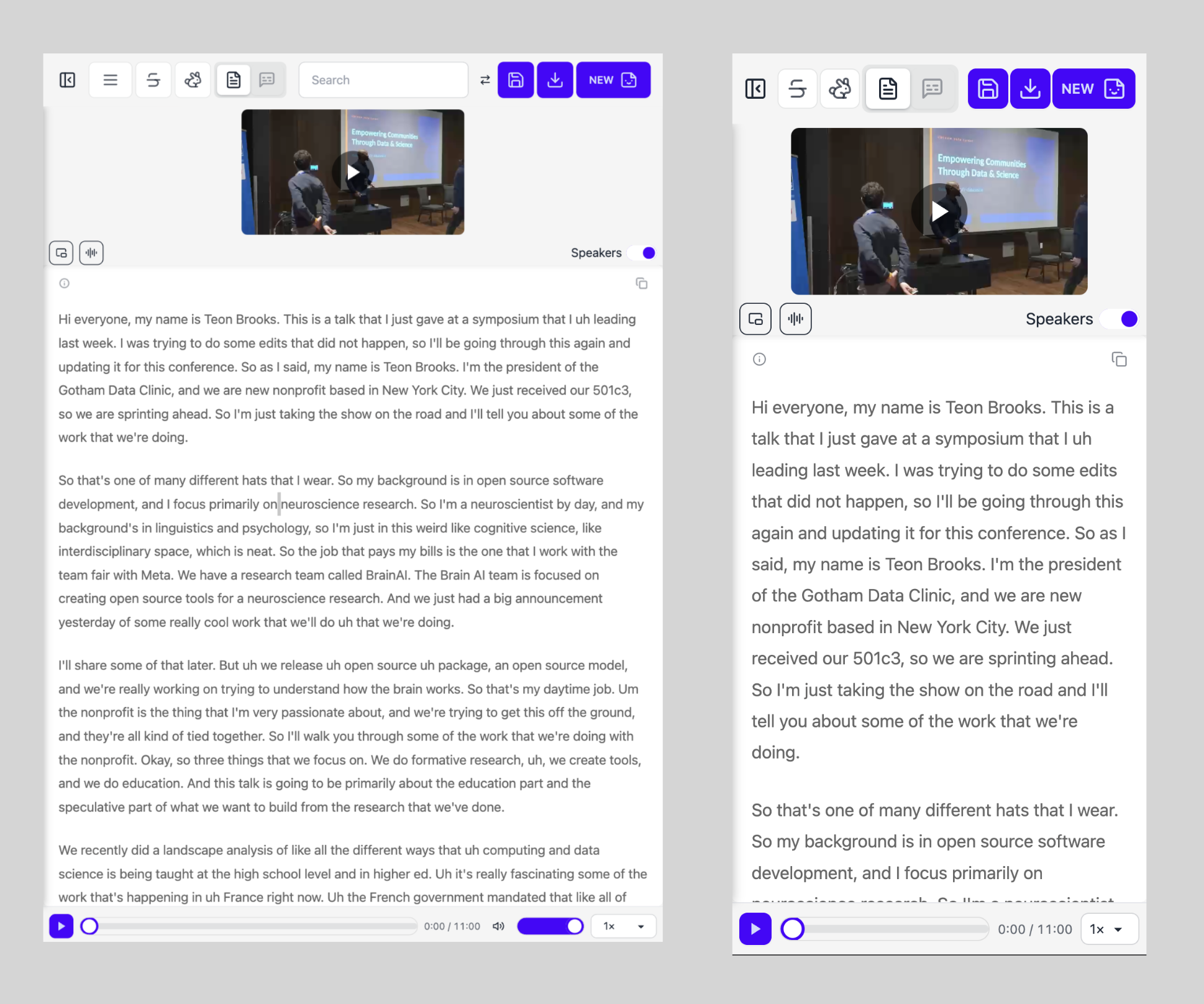
Fig 4 - Screenshots of emulated tablet and mobile view
7. Ease of Use
Very much related to the previous section, ease of use of an application involves UI and UX considerations.
Although a well designed application should be intuitive to use, its accessibility is enhanced by having clear and readable documentation. It’s tempting to skimp on this part but good documentation is always welcomed!
8. Ease of Installation and Longevity
The editor is open source and you can run it on any server you like. Because it's local-first you need only the most minimal of web servers – no backend, no middleware, no database, since all processing happens on your machine. We've also consciously avoided any build step: unzip the code into a folder on your webserver and point your browser at it. No lockfiles, no transformations of code from one format to another.
Dependencies are the other half of this. Using the web platform to the full lets us keep external dependencies to a minimum, though polyfills – libraries that mimic missing browser functionality – still have their place. It’s advisable to store what you do depend on locally, and load it only where it's needed. Fewer moving parts means fewer things to break, both at install time and years down the line. Simplicity facilitates longevity.
9. Adjustability – make it your own
The open source licensing of code means others are free to modify it in any way they see fit. Those modifications might be useful to others and that’s something the AGPL-3.0 licence incentivises.
Ensuring your code is readable, well commented and includes comprehensive technical documentation makes code accessible and more easily customised and improved. It also helps to provide areas for discussion and to address any user issues as promptly as possible. Community building, while usually requiring significant effort, can also help with distributing this workload.
10. Performance
The responsiveness and reactiveness of your application might not be the first thing you think of when considering accessibility but it has a significant effect on usability and so is very relevant. Areas to consider include start-up times, application size (which affects download and installation), responsiveness to user actions and feedback to any long lived processes (such as transcription in our case).
One area we really spent time on improving was the responsiveness of the editor itself. A 100 ms delay is barely noticeable on its own, but across a whole editing session those delays accumulate into something that feels sluggish. The shorter the gap between instruction and action, the smoother the editing, and the more likely the editor is to run at an acceptable speed on lower-end machines.
11. Portability
Making it easy to get your data out of an application and move it between installations without compromising your privacy is an important aspect of accessibility. The editor allows you to export in a number of standard formats and the .hyperaudio format is just a zip file containing transcript (html), captions (vtt) and media (mp4, mp3 etc).
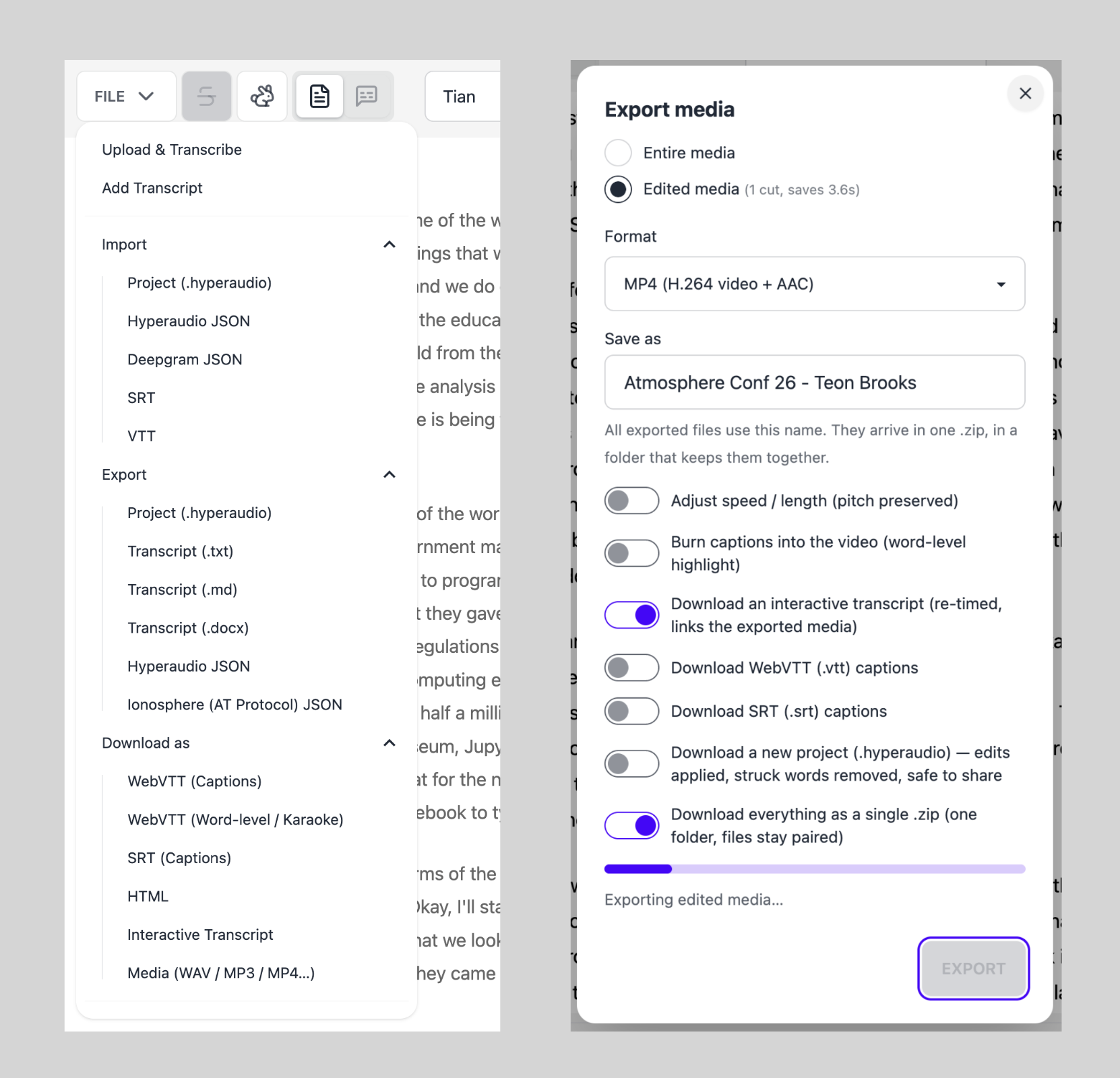 Fig 5 - File support and Export options
12. Cost
The editor is free to use since the speech-to-text algorithms run locally on your machine. That’s the financial cost. Regarding other costs – we found that it’s worth looking into issues related to energy and memory consumption to make sure applications run as efficiently as possible, and assets should be cached where possible to avoid the requirement to re-download. As a local-first PWA, the bandwidth requirement is kept to a minimum with the ability to run without any internet at all.
Summary
When we consider accessibility we often just scratch the surface of what can be done. Hopefully this article will act as food for thought when developing applications for which we want to maximise accessibility (which frankly, should be most of them). As we can see it’s multi-faceted – a spectrum of areas that make up a holistic approach for how we build applications for the modern web.
The Hyperaudio Lite Editor is well on the road to becoming that type of radically accessible application. An accessible tool for creating accessible publications.
It’s very much work in progress but I’d be grateful for any feedback people might have. It’s easy to try out so please have a go, add a star or leave feedback all in the GitHub repository. You can create an issue or visit the discussion forum. After all – a vital part of accessibility is having a strong community.